How to fetch balances with /volumes endpoint
Last updated: August 1, 2025
Like other endpoints, you first need to define your dataset in a filter. If you are not familiar with our filtering syntax, please refer to the documentation below:
Filtering syntax / /volumes endpoint
Let's say you have these accounts in your ledger, consumer:<consumer_ID>:loan:<loan_ID>:loan_receivable
If we use the following filter to get consumer 001's loans
{
    "$match": { "address": "consumer:001:loan::loan_receivable" }
}
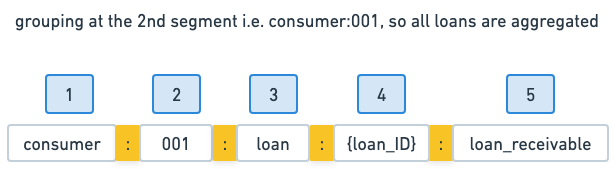
To aggregate on consumer, you can add groupBy=2, corresponding to the segment of its ID in account naming.
If you match other clients, this will return an aggregation per unique client ID (consumer:001, consumer:002 ...)
groupBy is aggregating the "sub" segments coming after the specified index only. It's not possible to group multiple segments
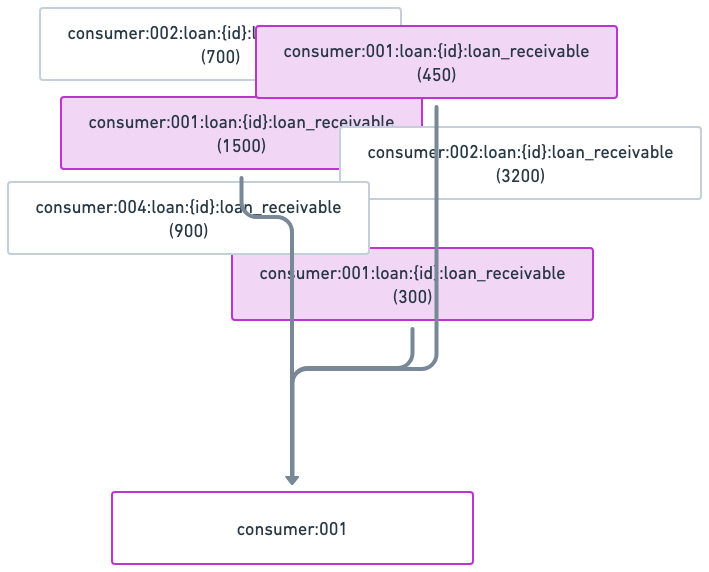
Results w/ groupBy=2
{
    "cursor": {
        "pageSize": 15,
        "hasMore": false,
        "data": [
            {
                "account": "consumer:001",
                "asset": "USD/2",
                "input": 50,
                "output": 2300,
                "balance": -2250
            }
        ]
    }
}
If the accounts hold more than one currency, this will aggregate per currency, so as many lines as currencies
{
    "cursor": {
        "pageSize": 15,
        "hasMore": false,
        "data": [
            {
                "account": "consumer:001",
                "asset": "USD/2",
                "input": 50,
                "output": 2300,
                "balance": -2250
            },
            {
                "account": "consumer:001",
                "asset": "EUR/2",
                "input": 100,
                "output": 25,
                "balance": 75
            }
        ]
    }
}input: total amound of the asset that came in
output: total amound of the asset that came out
balance = input - output
Results w/o groupBy
{
    "cursor": {
        "pageSize": 15,
        "hasMore": false,
        "data": [
            {
                "account": "consumer:001:loan:{id}:loan_receivable",
                "asset": "USD/2",
                "input": 50,
                "output": 500,
                "balance": -450
            },
            {
                "account": "consumer:001:loan:{id}:loan_receivable",
                "asset": "USD/2",
                "input": 0,
                "output": 1500,
                "balance": -1500
            }
            {
                "account": "consumer:001:loan:{id}:loan_receivable",
                "asset": "USD/2",
                "input": 0,
                "output": 300,
                "balance": -300
            }
        ]
    }
}